SVG to PNG in Node and Python
sharp and CairoSVG draw an SVG's text with whatever fonts the machine has installed. Here is what that does to a design, and how to convert SVG with the fonts it names, from Node or Python, in one call.
Why the text changes
An SVG doesn't carry its fonts. font-family="Bricolage Grotesque" is just a name, and the program that draws the SVG has to find a font by that name. sharp (through librsvg) and CairoSVG look for it among the fonts installed on the machine. When it isn't there, they quietly draw the text in something that is.
Neither one fetches web fonts. We tried the usual fixes: an @import of the Google Fonts stylesheet inside the SVG made no difference to either library's output, and neither did a font embedded as an @font-face with a data: URL. Here is the same SVG three ways, converted on a Mac that has neither font installed:
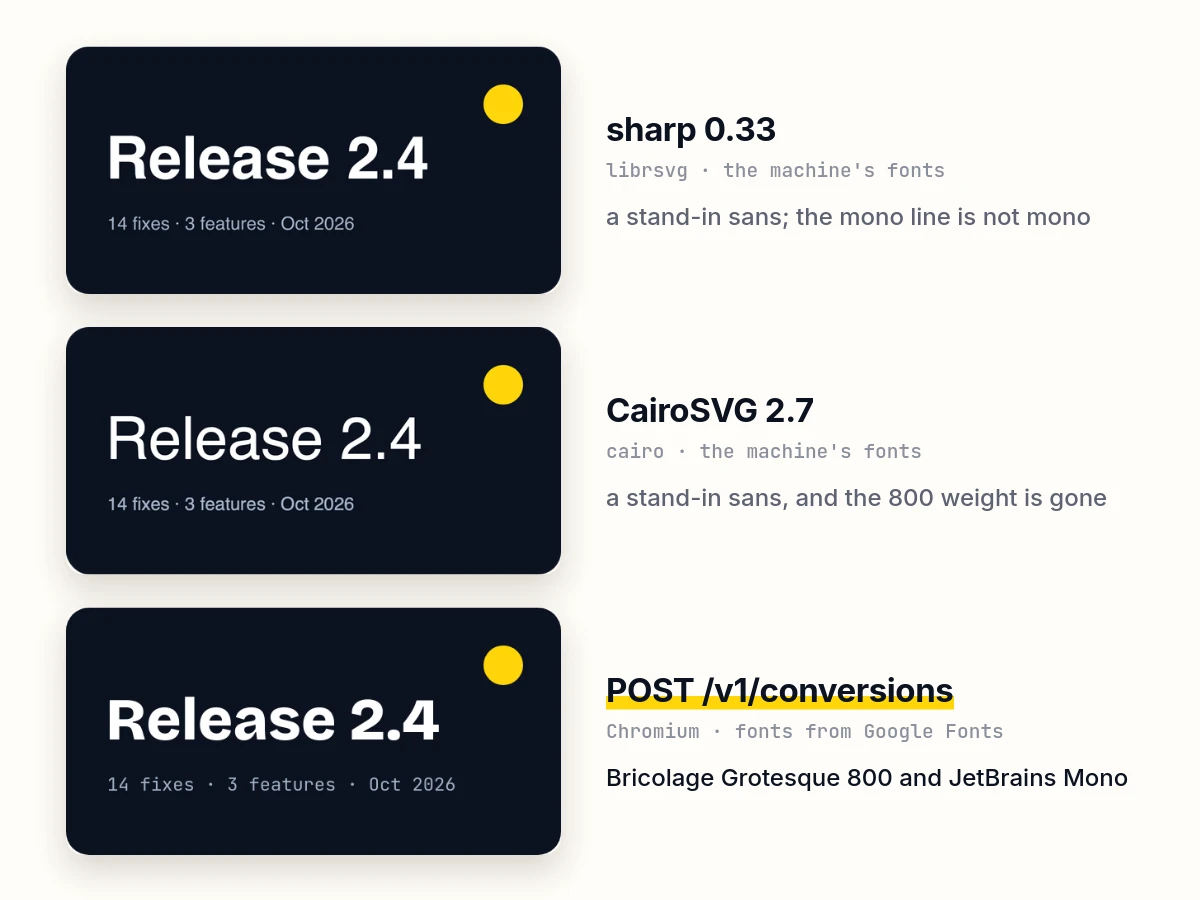
On a Linux server the stand-in is usually DejaVu Sans instead. The usual fixes all have a cost:
- Install the fonts on every machine and in every container image that converts, family by family. sharp and CairoSVG then find them by name. This works until someone uses a new font.
- Convert the text to paths in the design tool before exporting. The file grows, the text stops being text, and it doesn't help with SVG your code generates: charts, badges, diagrams an agent drew.
- Run headless Chrome and screenshot the SVG. Chrome loads web fonts the way a page does. This is what the API below does, without you running Chromium.
A browser has the same limit when an SVG is an image. Through <img src="logo.svg"> or a canvas, an SVG can't load anything external, fonts included. That's why the API puts the SVG inline in a page before capturing it.
One call
POST /v1/conversions takes the file as the request body, with the options in the query string:
curl -X POST 'https://api.imageapis.com/v1/conversions?width=1200&response=binary' \
  -H 'X-API-Key: YOUR_KEY' -H 'Content-Type: image/svg+xml' \
  --data-binary @logo.svg -o logo.png
Every family the SVG names is loaded from Google Fonts before the capture. That covers font-family and the font shorthand, in attributes, style and <style> CSS alike. With response=binary you get the PNG back. Without it you get a JSON record whose url is the same file hosted at img.imageapis.com, kept 30 days on Free and a year on paid plans. Each conversion is one image against your plan.
Node.js
Node 18 and later have fetch, so there's nothing to install:
import { readFile, writeFile } from "node:fs/promises";

const API = "https://api.imageapis.com";
const KEY = process.env.IMAGEAPIS_KEY;

async function svgToPng(svgPath, outPath, options) {
  const query = new URLSearchParams({ ...options, response: "binary" });
  const res = await fetch(`${API}/v1/conversions?${query}`, {
    method: "POST",
    headers: { "X-API-Key": KEY, "Content-Type": "image/svg+xml" },
    body: await readFile(svgPath),
  });
  if (!res.ok) throw new Error(`${res.status}: ${(await res.json()).message}`);
  await writeFile(outPath, Buffer.from(await res.arrayBuffer()));
  return res.headers.get("X-Image-Url"); // the same file, hosted
}

await svgToPng("logo.svg", "logo.png", { width: 1200 });
await svgToPng("logo.svg", "logo.webp", { width: 600, format: "webp" });
await svgToPng("logo.svg", "icon-512.png", { width: 512, height: 512, fit: "contain" });
Errors come back as JSON with a message, so the thrown error says what went wrong, for example 400: width must be at most 4096.
To export an icon set at 1×, 2× and 3×, call it in a loop:
import { readdir, mkdir } from "node:fs/promises";

await mkdir("png", { recursive: true });
for (const file of (await readdir("icons")).filter((f) => f.endsWith(".svg"))) {
  for (const scale of [1, 2, 3]) {
    const name = file.replace(/\.svg$/, scale === 1 ? ".png" : `@${scale}x.png`);
    await svgToPng(`icons/${file}`, `png/${name}`, { width: 24 * scale, height: 24 * scale, fit: "contain" });
  }
}
Python
import os, requests

API = "https://api.imageapis.com"
KEY = os.environ["IMAGEAPIS_KEY"]

def svg_to_png(svg_path, out_path, **options):
    with open(svg_path, "rb") as f:
        r = requests.post(f"{API}/v1/conversions", params={**options, "response": "binary"}, data=f,
                          headers={"X-API-Key": KEY, "Content-Type": "image/svg+xml"})
    if not r.ok:
        raise RuntimeError(f"{r.status_code}: {r.json()['message']}")
    with open(out_path, "wb") as out:
        out.write(r.content)
    return r.headers["X-Image-Url"]   # the same file, hosted

svg_to_png("logo.svg", "logo.png", width=1200)
svg_to_png("logo.svg", "logo-small.webp", width=300, format="webp")
SVG your code generates doesn't have to touch the disk. Send it as text in JSON, in svg. A matplotlib chart in your brand font is a good example. With svg.fonttype set to none, matplotlib writes the text as text, named by its family, so the font doesn't have to be installed where the chart is made or where it's converted:
import io
import matplotlib.pyplot as plt

plt.rcParams["svg.fonttype"] = "none"          # keep text as text, named by its family
plt.rcParams["font.family"] = "IBM Plex Sans"  # on Google Fonts, so the render loads it
fig, ax = plt.subplots(figsize=(8, 4))
ax.bar(["Mon", "Tue", "Wed", "Thu", "Fri"], [120, 180, 150, 210, 260], color="#6366f1")
ax.set_title("Signups this week")
svg = io.StringIO()
fig.savefig(svg, format="svg")

r = requests.post(f"{API}/v1/conversions", headers={"X-API-Key": KEY},
                  json={"svg": svg.getvalue(), "width": 1600})
print(r.json()["url"])
matplotlib warns that it can't find the font. It still names it in the SVG, and the converted chart comes out in IBM Plex Sans. It sizes its SVGs in points (576 × 288 pt here), which the API reads at 96 px to the inch.
Which fonts load
- Families on Google Fonts load by name. The 80 in the fonts list load with every weight they have. Any other Google Fonts family loads its regular weight, so bold text in it is thickened by the browser rather than drawn from the real bold.
- A font that isn't on Google Fonts, such as a licensed brand face, can't be fetched by name. Embed it in the SVG with
@font-faceand adata:URL. The API renders it, and sharp and CairoSVG don't. - System names (Arial, Helvetica, Times New Roman, Georgia,
sans-serif) aren't requested, and the render browser's own fonts draw them. fonts, a list in the JSON body, loads families the SVG doesn't name itself, such as one its CSS picks through a custom property (font-family: var(--brand)).
Size, shape and background
- No size given: the output is the SVG's own
widthandheight, or itsviewBox. Physical units count at 96 px to the inch, so Inkscape's210mmis 794 px. Anything larger is brought down to 4096 px on the longer side. widthorheightalone: the other side follows the SVG's shape. An SVG is a drawing, so a 24-pixel icon is as sharp at 1024 as at 24.- Both:
fitdecides.cover(the default) fills the box and crops,containfits the whole SVG in and leaves the rest transparent orbackground,fillstretches, andinsideshrinks the box to the SVG's shape. - Transparency: PNG and WebP keep it. JPEG has none, so transparent areas take
backgroundor white. - Limits: 10 MB in, 4096 px a side out.
The same endpoint converts PNG, JPEG, WebP, GIF and AVIF too. An animated GIF gives its first frame. To try an SVG without writing code, paste it into the SVG to PNG tool. An agent connected over MCP has the same operation as the convert_image tool, and it passes the SVG it drew as svg text.