Starters · 1000 × 400 · 10 layers · 6 variables · ticket, qr, pdf
Event ticket with QR
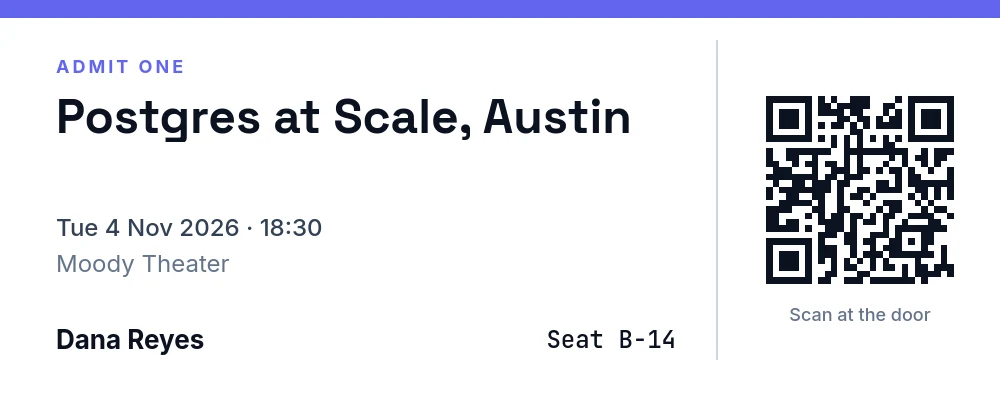
A wide ticket: event, date and venue on the left, the holder's name and seat, a perforation, and a QR code of the ticket URL on the right.
rendering…
the same render with your saved copy
curl -X POST https://api.imageapis.com/v1/images \
  -H 'X-API-Key: YOUR_KEY' -H 'Content-Type: application/json' \
  -d '{"template": "tpl_…", "variables": {"event": "Postgres at Scale, Austin", "date": "Tue 4 Nov 2026 · 18:30", "venue": "Moody Theater", "name": "Dana Reyes", "seat": "B-14", "ticket_url": "https://example.com/t/8f3k2"}}'
Make it yours
Copy the starter into your account once; from then on it is a template id you render with new variables. Creating and reading templates is free.
curl -s https://api.imageapis.com/v1/starters/event-ticket -H 'X-API-Key: YOUR_KEY' | jq .template > event-ticket.json
curl -X POST https://api.imageapis.com/v1/templates -H 'X-API-Key: YOUR_KEY' \
  -H 'Content-Type: application/json' -d @event-ticket.json
# → { "id": "tpl_…", "object": "template", … }
Change any layer by name at render time with modifications, or change the design itself in the editor and save it back with PUT /v1/templates/<id>.
Layers
| Name | Type | x, y | Size | Content |
|---|---|---|---|---|
band | rect | 0, 0 | 1000 × 18 | |
label | text | 56, 56 | 600 × 28 | ADMIT ONE |
event | text | 56, 92 | 620 × 110 | {{event}} |
date | text | 56, 214 | 620 × 34 | {{date}} |
venue | text | 56, 250 | 620 × 34 | {{venue}} |
holder | text | 56, 320 | 420 × 40 | {{name}} |
seat | text | 480, 320 | 196 × 40 | Seat {{seat}} |
perforation | rect | 716, 40 | 2 × 320 | |
qr | qr | 760, 90 | 200 × 200 | {{ticket_url}} |
scan | text | 740, 304 | 240 × 30 | Scan at the door |
The template
Show the JSON (10 layers)
{
  "name": "Event ticket",
  "width": 1000,
  "height": 400,
  "background": "#ffffff",
  "layers": [
    {
      "name": "band",
      "type": "rect",
      "x": 0,
      "y": 0,
      "width": 1000,
      "height": 18,
      "fill": "#6366f1"
    },
    {
      "name": "label",
      "type": "text",
      "x": 56,
      "y": 56,
      "width": 600,
      "height": 28,
      "text": "ADMIT ONE",
      "font": "Inter",
      "weight": 700,
      "size": 18,
      "color": "#6366f1",
      "letter_spacing": 3
    },
    {
      "name": "event",
      "type": "text",
      "x": 56,
      "y": 92,
      "width": 620,
      "height": 110,
      "text": "{{event}}",
      "font": "Space Grotesk",
      "weight": 700,
      "size": 48,
      "color": "#0b1220",
      "fit": "shrink",
      "max_lines": 2,
      "line_height": 1.05
    },
    {
      "name": "date",
      "type": "text",
      "x": 56,
      "y": 214,
      "width": 620,
      "height": 34,
      "text": "{{date}}",
      "font": "Inter",
      "weight": 500,
      "size": 24,
      "color": "#334155"
    },
    {
      "name": "venue",
      "type": "text",
      "x": 56,
      "y": 250,
      "width": 620,
      "height": 34,
      "text": "{{venue}}",
      "font": "Inter",
      "weight": 400,
      "size": 24,
      "color": "#64748b"
    },
    {
      "name": "holder",
      "type": "text",
      "x": 56,
      "y": 320,
      "width": 420,
      "height": 40,
      "text": "{{name}}",
      "font": "Inter",
      "weight": 700,
      "size": 26,
      "color": "#0b1220",
      "valign": "middle"
    },
    {
      "name": "seat",
      "type": "text",
      "x": 480,
      "y": 320,
      "width": 196,
      "height": 40,
      "text": "Seat {{seat}}",
      "font": "JetBrains Mono",
      "weight": 500,
      "size": 24,
      "color": "#0b1220",
      "valign": "middle",
      "align": "right"
    },
    {
      "name": "perforation",
      "type": "rect",
      "x": 716,
      "y": 40,
      "width": 2,
      "height": 320,
      "fill": "#cbd5e1"
    },
    {
      "name": "qr",
      "type": "qr",
      "x": 760,
      "y": 90,
      "width": 200,
      "height": 200,
      "data": "{{ticket_url}}",
      "color": "#0b1220",
      "background": "#ffffff",
      "margin": 1
    },
    {
      "name": "scan",
      "type": "text",
      "x": 740,
      "y": 304,
      "width": 240,
      "height": 30,
      "text": "Scan at the door",
      "font": "Inter",
      "weight": 500,
      "size": 18,
      "color": "#64748b",
      "align": "center"
    }
  ]
}